Add objects
New objects come from the ADD OBJECT menu in the toolbar, from the column of buttons along the left edge of the window or from a right-click in the viewport. The menu and the buttons put the object at the center of the scene. A right-click puts it at the spot you clicked.
Add an object at the center of the scene
Click ADD OBJECT in the toolbar and choose a type, such as SPHERE.
The object appears at the center of the scene and is selected. The INSPECTOR on the right shows its name, such as Sphere 1, and its settings.
The column of buttons at the left edge of the window holds the same types in the same order, and each click adds one object. With SHOW TOOLTIPS on in the settings, holding the pointer over a button shows its name, such as Add Lathe. When the window is short, scroll the column to reach the lower buttons.
Objects added this way all land on the same spot, so a second one can end up inside the first. Add a box and then a cylinder, and the cylinder stands hidden inside the box. Either move one of them aside, following Move, rotate and scale objects, or place the second one with a right-click.
Add an object where you click
Right-click an empty part of the ground in the viewport.
A menu opens with an item for each type, such as ADD BOX, followed by ADD LIGHT and PEN / LOFT.
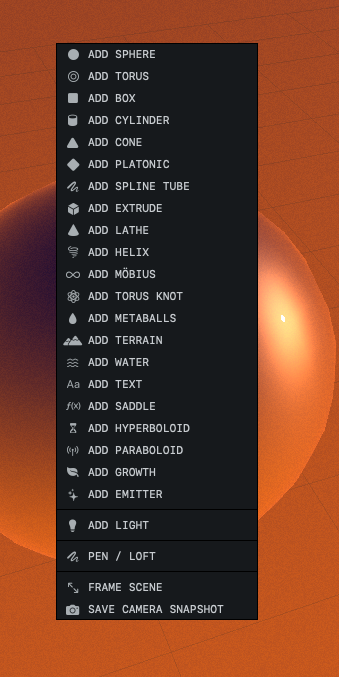
Choose a type.
The object appears at the spot you clicked and is selected.
A right-click on an object opens a menu of actions for that object, with no items for adding new objects. Water does not count as an object here, and a right-click on it opens the ADD menu. If you right-click the sky, where no ground lies under the pointer, the new object lands at the center of the scene.
Where new objects land
The center of the scene is the point where X and Z are both 0. A new object sits with its lowest point at height 0, which is ground level unless the environment settings move the ground.
When the ground has been raised or lowered, a new object still sits at height 0, so it can float above the ground or sink into it. Right-click the object and choose DROP TO GROUND to set it on the ground.
A light starts higher up. ADD OBJECT ▸ LIGHT places it 6 meters up and 4 meters from the center, on the side where the camera starts. ADD LIGHT in the right-click menu places it 6 meters above the spot you clicked.
Each new object is named after its type with a number, such as Box 1. Most types start out chrome; a terrain gets the Landscape material and water the Water material. Adding an object is one undo step, so ⌘Z removes it.
The types
Each type is named as the menu shows it. The settings of each one are listed in Object types.
Basic solids
| Type | What you get |
|---|---|
| SPHERE | A ball 2 meters across. |
| TORUS | A ring shaped like a doughnut. |
| BOX | A cube 2 meters on each side. |
| CYLINDER | A round column 2 meters tall. |
| CONE | A cone 2 meters tall. |
| PLATONIC | A regular solid with flat faces. It starts as an icosahedron, which has 20 triangular faces, and TYPE switches it to one of the other four. |
Shapes drawn from curves
| Type | What you get |
|---|---|
| SPLINE TUBE | A tube that follows an S-shaped path. |
| EXTRUDE | A star outline pushed out into a solid. |
| LATHE | A vase, made by spinning an outline around an upright axis. |
| TEXT | The word Orbit in solid letters, covered in Make 3D text. |
The path of a tube and the outlines of an extrusion and a lathe can be redrawn, as in Shape a lathe, extrusion or tube with curves.
Mathematical shapes
| Type | What you get |
|---|---|
| HELIX | A wire coiled like a spring. |
| MÖBIUS | A strip with a half twist, which leaves it with only one side. |
| TORUS KNOT | A tube that winds around and through a ring and ties itself in a knot. |
| SADDLE | A curved sheet, raised on two opposite sides and lowered on the other two, drawn over with straight lines. |
| HYPERBOLOID | A shape like a cooling tower, pinched at the waist. |
| PARABOLOID | A round dish. |
Nature and effects
| Type | What you get |
|---|---|
| METABALLS | Three soft blobs that merge where they meet. |
| TERRAIN | A mountain landscape 20 meters on each side, described in Build a terrain. |
| WATER | A water surface that reaches to the horizon. See Add water and choose its waves. |
| GROWTH | A tree grown from a random number, so each one has its own branches. Grow plants covers the other kinds. |
| EMITTER | A source of small glowing specks, as in Add fireflies and glowing motes. |
LIGHT adds a point light, which shines in all directions; Light a scene covers the other kinds of light. PEN / LOFT turns on the pen, and the object is built from the strokes you then draw; see Draw shapes with the pen.
To make any of these objects larger or smaller, use the SCALE fields under TRANSFORM in the INSPECTOR. The round basic solids also have SIDES and SEGMENTS, which set how many flat faces make up the curved surface.