How loops work
A loop in Orbit is a stretch of time, 2 to 60 seconds long, that starts again from the beginning each time it ends. When the loop ends, everything that moves has to be back where it began. That includes settings driven by lanes and effects that move on their own, such as swaying plants and drifting clouds. Anything that ends somewhere else jumps at the join, once on every repeat.
The loop clock
LOOP, under DURATION in Loop Studio, sets the length. During playback a clock counts from 0 to that length and starts over. Every moving part of the scene reads this one clock. A lane drives one setting from it. Swaying plants, drifting clouds and fog banks, glowing motes and moving water read it as well, with no lane.
The clock runs during Loop Studio playback and while a loop or a turntable is exported, and a turntable export fits the effects to its own length. At all other times the clock stands at 0, so the moving effects hold still at their first frame in the viewport, in the LIVE preview and in still renders. A plant's lean in the wind shows everywhere, because it depends only on the wind and the plant's WIND RESPONSE. The sway around that lean waits for the clock.
Lanes and whole cycles
A lane in LFO mode is a wave that repeats RATE times per second around the value its setting has when ▶ PLAY is clicked or an export starts. It returns to its starting value only at the end of a full cycle, so it closes the loop only when the loop holds a whole number of cycles. The count is RATE times LOOP. At 0.50 Hz in a 6-second loop, the wave runs 3 cycles and ends where it began. At 0.40 Hz it runs 2.4 cycles, so the loop ends partway through the third, and the next repeat starts the wave from the beginning of a cycle again. The setting jumps between those two values.
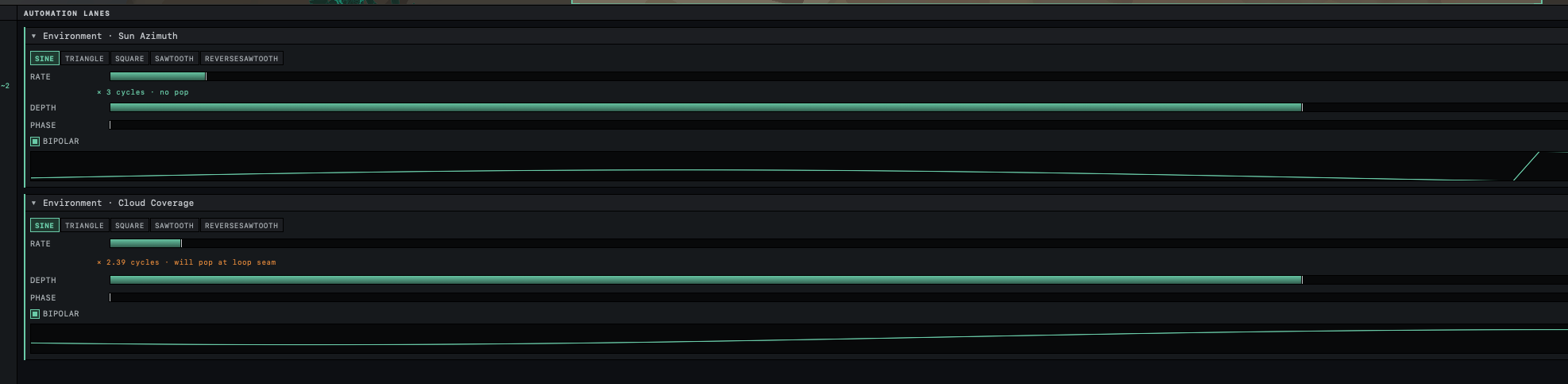
A lane in CURVE mode sets a value at points from the start of the loop to its end, and it closes when its last point has the value of its first. When LOOP changes, a curve stretches to the new length and still closes. A wave keeps its RATE, so its cycle count changes, and a lane that closed at one length can jump at another.
RATE goes no lower than 0.10 Hz, one cycle every 10 seconds. A wave in a loop longer than 10 seconds therefore needs at least two cycles to close, and one slow change across a long loop has to be drawn as a curve.
Sawtooth waves
A SAWTOOTH climbs through each cycle and drops back to the bottom in one step at the end of it. REVERSESAWTOOTH falls and jumps back up. With whole cycles, the wave ends the loop at the start of a cycle, where it began. The drop that takes it there is still a jump, the same one the wave makes at the end of every cycle, and the join is one of those ends. The loop status counts the lane as a jump, and SNAP cannot help, because it changes only RATE.
Sun Azimuth and Cloud Hue are the exception. Each goes around a circle, where 360° and 0° are the same direction or the same hue. At DEPTH 1.00 a sawtooth on either one covers exactly 360° in each cycle, so the top of its climb and the bottom of the next cycle are the same angle, and the sun circles the sky without a break. Rotation lanes on objects stop at the ends of their range and do not wrap, so a sawtooth on a rotation always counts as a jump.
Effects that move without a lane
Any one of these effects is enough for ▶ PLAY and an export, with no lane in the scene. Orbit fits each to the length of the loop so that it closes at the join.
| Effect | Moves when | How it fits the loop |
|---|---|---|
| Plants sway | WIND RESPONSE is above 0 and the wind's STRENGTH is above 0 | A plant sways around its lean about 0.4 times per second, rounded to a whole number of sways per loop. A 6-second loop holds two. |
| Clouds drift | Clouds are on and STRENGTH is above 0 | Clouds drift downwind at a steady speed. Over the loop, Orbit fades them into a copy that trails one loop's drift behind and reaches their starting position at the join. |
| Fog banks drift | LAYERED fog with NOISE AMOUNT above 0, and STRENGTH above 0 | As for clouds, at the same speed |
| Glow motes | A plant with glow motes, or an emitter | Each mote rises and fades over a life of 3 to 8 seconds. Orbit lengthens or shortens each life so a whole number fits in the loop, and rounds the flicker the same way. |
| Water | SPECTRAL waves, or CLASSIC ripples with WAVE SPEED above 0 | Only SPECTRAL waves fit, as described below. |
Water is the only one of these with a status in the PLAYBACK column. The others always close.
Wind has no lane
Orbit places drifting clouds and fog banks from the wind's direction and strength and the time since the loop began. A steady wind carries them a fixed distance each second, so their offset is that speed times the time elapsed, and the trailing copy that closes the loop sits exactly one loop's drift behind. Motes drift downwind by the same rule over each life. A wind that changed during the loop would carry them unevenly. The copy would no longer line up with the start, and the drift would jump at the join. For that reason DIRECTION and STRENGTH do not appear in PARAMETERS. Lanes on Cloud Coverage, Fog Density and a plant's shape work alongside the wind, as described in Make things move in the wind.
SPECTRAL and CLASSIC water
A SPECTRAL sea is the sum of 24 waves of different lengths. During a loop, Orbit adjusts the speed of each wave slightly so that it rises and falls a whole number of times in the loop, and the sea returns to its first frame at the join. The longest swells rise and fall most slowly, and a short loop may not hold even one of their cycles. Orbit then speeds them up to one cycle, and the status reads WATER · NO POP · SWELLS FAST. That happens when LOOP is shorter than 2π × WIND SPEED ÷ 9.81 seconds, which is 5.12 s at the top WIND SPEED of 8 m/s. At the default 3 m/s the limit is 1.92 s, below the shortest loop.
CLASSIC ripples are a random pattern that slides across the water at WAVE SPEED. The pattern moves farther from its start the longer it runs and never repeats, so no loop length closes it. A WAVE SPEED of 0 holds the ripples still, and still water closes any loop. The wave styles with the LOOPS badge in the WAVE GALLERY are the spectral ones; Add water and choose its waves describes both models.
Lanes that reshape objects
Most lanes change a value that the renderer reads as it draws, such as a position, a material setting, a light's intensity or the sun's height, and playback applies them on every frame. A lane on a deformer, Sides or Segments changes the shape itself, and the object has to be rebuilt for each new value. A plant swaying in the wind needs rebuilding too. Doing that many times a second would slow the preview, so after ▶ PLAY Orbit first builds each of them for every frame of the loop, at 30 frames per second of loop time. ▶ PREPARING shows the progress, and playback then runs from the stored frames.
The frames are built from the lanes as they stood at ▶ PLAY. A change to one of these lanes during playback shows after ■ STOP and the next ▶ PLAY. When the stored frames would take too much memory, or an object rebuilds too slowly, the preview holds that object's shape still and its lane shows ❄. An export builds every frame in full either way.
Export frames and time
An export renders LOOP times the frame rate, rounded to a whole number of frames. A 6-second loop gives 144 frames as a GIF, at 24 frames per second, and 180 as an MP4, at 30. Each frame shows the loop at its share of the way through, so in the 6-second MP4 frame 0 is at 0 s, frame 1 at 1/30 s and the last, frame 179, at 5.967 s. The frame at 6 s would be the same picture as frame 0, so Orbit leaves it out. When the file plays again, frame 0 comes one frame after frame 179, the same interval as between any two frames, and the timing across the join stays even. Export a loop gives the steps.
Related: Animate a setting with a lane, Make a loop without a jump, Loop Studio controls and Add fireflies and glowing motes.