Make a loop without a jump
A loop exported from Orbit plays over and over. When every lane ends where it began and the water repeats exactly, the join between the last frame and the first does not show. Set the length of the loop, then use Orbit's check on each lane and on moving water to find and fix whatever would jump.
The procedures start in Loop Studio with at least one lane, as in Animate a setting with a lane.
Set the loop length
In PLAYBACK, under DURATION, click the number beside LOOP, type a length in seconds, such as
8, and press Return.The number reads 8.00 s. Dragging along the slider also works. The length can be 2 to 60 seconds, and a new scene starts at 6 seconds.
Every lane in the scene shares this length. A curve lane stretches or shrinks to fit it. A wave lane keeps its RATE, so it completes a different number of cycles, and a lane that joined cleanly at the old length may jump at the new one. During playback, CURRENT under the slider shows how far into the loop the playhead is.
Whole cycles
Orbit never renders a final frame that repeats the first one, so the timing of the loop joins up by itself. A jump at the join comes from a lane whose setting ends at a different value than it started with.
A wave lane returns to its starting value only after a whole number of cycles. The count is RATE times the length of the loop, and the hint under RATE shows it. At 0.50 Hz in a 6-second loop, the wave completes 3 cycles and the hint reads × 3 cycles · no pop. At 0.40 Hz it completes 2.4, stops partway through the third, and the hint turns amber and reads × 2.40 cycles · will pop at loop seam.
A curve lane joins cleanly when its last point sits at the value of its first point. When the two differ, a dashed amber line spans the gap at the right edge of the curve area.
Read the loop status
The top of the PLAYBACK column shows the result of the check on all lanes. It stays empty while the scene has no lanes.
| Status | Meaning |
|---|---|
| LOOP · NO POP | Every lane ends where it began. |
| LOOP · 2 WILL POP (amber) | Two lanes would jump at the join. The number counts them. |
A muted lane never counts as a jump, because it does not change its setting.
Fix the lanes that jump
Click the amber LOOP · 2 WILL POP.
The LOOP INTEGRITY list opens. Each row names a lane and gives the reason, such as × 2.40 cycles in 6.0s (not whole) for a wave or 0.300 → 0.700 at seam (mismatch) for a curve. Most rows use Orbit's internal names for settings, so the Sun Azimuth lane appears as Environment · sunAzimuth.
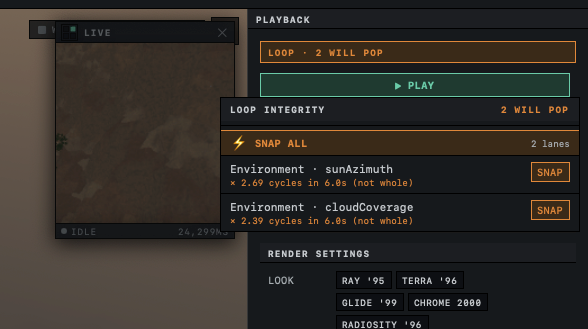
Click ⚡ SNAP ALL, or click SNAP on a single row.
Each lane that SNAP can fix drops out of the list. When no lane is left, the status reads LOOP · NO POP.
On a wave lane, SNAP sets RATE to the nearest rate that completes a whole number of cycles, and never fewer than one. The wave runs a little faster or slower as a result, and the RATE readout may not show the change because it rounds to two decimals. On a curve lane, SNAP moves the last point to the value of the first. The same SNAP appears on the lane itself, beside the amber hint of a wave or at the top of a curve.
RATE cannot go below 0.10 Hz, so a wave lane needs at least one cycle every 10 seconds. On a loop longer than 10 seconds a single cycle is out of reach, and a lane whose nearest whole count is one cycle still jumps after SNAP. Raise RATE until the hint shows 2 or more. For one slow change across a long loop, draw it as a curve, which stretches to any length.
Sawtooth waves
SAWTOOTH climbs through its cycle and then falls back to the bottom in one step, and REVERSESAWTOOTH does the reverse. That step is a jump of its own, so these two shapes jump at the join even with whole cycles, and SNAP cannot help because it changes only RATE. The lane stays in the LOOP INTEGRITY list, where its reason shows a whole number of cycles, such as × 3.00 cycles in 6.0s (not whole), while the hint on the lane reads no pop. Switch such a lane to SINE or TRIANGLE.
Sun Azimuth and Cloud Hue are angles, where 360° and 0° are the same. On these two a sawtooth at DEPTH 1.00 turns one full circle per cycle and lands where it started. Rotation lanes on objects are not treated this way, and a sawtooth on them always counts as a jump.
Turn the sun once around the sky
A sawtooth on Sun Azimuth makes the sun circle the scene without a jump.
In PARAMETERS, click ENVIRONMENT, then click Sun Azimuth.
A lane titled Environment · Sun Azimuth appears.
- In the lane, click SAWTOOTH. Click the number beside DEPTH, type
1and press Return. Set LOOP under DURATION to
10, then set RATE in the lane to0.1.The hint reads × 1 cycles · no pop, and the status reads LOOP · NO POP.

Click ▶ PLAY.
The sun travels once around the horizon every 10 seconds, at the same height.
In a shorter loop, raise RATE until the hint shows a whole number again, such as 0.20 Hz for 5 seconds. Ten seconds is the longest loop in which the sun can make a single turn, because of the 0.10 Hz limit on RATE.
Moving water
Water gets its own status, below the lane status, whenever a water surface in the scene has moving waves that show. Only water with BUMP ENABLED on and STRENGTH above 0 in its RIPPLES section is checked.
| Status | Meaning | What to do |
|---|---|---|
| WATER · followed by → SPECTRAL (amber) | A water surface uses the CLASSIC wave model with WAVE SPEED above 0. Its ripples keep drifting and never return to their first position. | Click SCENE, select the water and click SPECTRAL at the top of RIPPLES. To keep classic ripples, set WAVE SPEED to 0, which holds them still. |
| WATER · NO POP · SWELLS FAST (amber) | Spectral waves repeat, but the loop is shorter than the slowest swell, and Orbit speeds the swells up to fit. | Lengthen LOOP, or lower WIND SPEED in RIPPLES. At the top WIND SPEED of 8 m/s, a loop of 5.2 seconds is long enough. |
| WATER · NO POP ✓ | Spectral waves repeat exactly within the loop. | Nothing. |
The wave models are described in Add water and choose its waves. Glowing motes, swaying plants and drifting clouds or fog banks need no check, because Orbit fits their motion to whole cycles of the loop.
If a loop still jumps after these fixes, The loop jumps where it repeats has further cases. How loops work explains the join and the rule of whole cycles.
Next: Export a loop.