Add fireflies and glowing motes
Glowing motes are small points of light that drift upward and flicker, like fireflies or sparks. A plant can carry them in its branches, and an EMITTER object releases them anywhere in the scene. They stay still while you work on the scene and move during Loop Studio playback and in exported loops and turntables.
Give a plant glowing motes
Select a plant. In the INSPECTOR, find GLOW MOTES, the section below GROWTH, and click ENABLED.
Green points appear on the plant, and the mote settings open below the switch.
Choose where the motes gather: TIPS, CANOPY or BASE.
TIPS keeps them at the ends of the branches, while CANOPY spreads them over the forks as well as the tips. With BASE they scatter over the ground around the foot of the plant.
The motes belong to the plant and follow it when you move it, and each copy in a forest array carries its own. REROLL in the GROWTH section reshuffles the motes along with the shape of the plant. How far wind carries them is set by the plant's WIND RESPONSE, the same slider that makes the plant lean.
Place an emitter
An emitter is an object that does nothing but release motes. It has no surface, and in a render only its motes show.
Choose ADD OBJECT ▸ EMITTER.
An emitter appears at the center of the scene and is selected. White motes gather around a single point, and the INSPECTOR shows the EMITTER section with ENABLED already on.
To place it somewhere else as you add it, right-click an empty spot on the ground in the viewport and choose ADD EMITTER.
Choose the shape the motes start from: POINT, DISC, SHELL or LINE.
DISC spreads them over a flat circle, SHELL over the surface of a ball and LINE along a straight line. RADIUS appears for these three shapes.
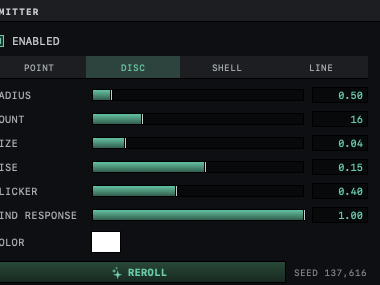
Set RADIUS, from 0.05 m to 5 m, for the size of the disc, ball or line.
The area the motes start from grows or shrinks.
Move the emitter with the gizmo, as in Move, rotate and scale objects.
The motes move with it. Turning or scaling the emitter turns or stretches its shape as well, and the direction the motes rise turns with it.
A DISC laid over water or grass at dusk gives a field of fireflies. REROLL, at the bottom of the section, scatters the motes differently and gives each a new rhythm, and the number after SEED changes. The same seed always gives the same motes, so a saved scene opens with the motes it had.
Mote settings
Plants and emitters share these settings. WIND RESPONSE appears in the EMITTER section, while a plant uses the slider in its GROWTH section.
| Setting | Effect | Default |
|---|---|---|
| COUNT | How many motes, from 1 to 64 | 16 |
| SIZE | How large each mote is, from 0.01 m to 0.2 m | 0.04 m |
| RISE | How fast the motes climb, in meters per second. Negative values make them sink. | 0.15 |
| FLICKER | How strongly each mote pulses in brightness. At 0 it glows steadily. | 0.40 |
| WIND RESPONSE | How far the scene wind carries the motes, from 0 to 1 | 1.00 |
| COLOR | The color of the motes | Green on a plant, white on an emitter |
Each mote lives a few seconds. It fades in, travels, fades out and starts over, and each mote starts at a different moment, so they do not all fade at once. Motes give off no light, so the ground and the plant around them stay as dark as before. To make them bloom into soft halos, turn on GLOW / BLOOM, which Glow and lens flares sets up.
Watch the motes move
Click LOOP STUDIO, at the top left of the window.
The viewport moves beside the PLAYBACK column.
Click ▶ PLAY in the PLAYBACK column.
The motes rise, flicker and drift with the wind. Glowing motes on their own are enough to make ▶ PLAY available.
Click ■ STOP.
The motes return to where they were at the start of the loop.
In an exported loop the life of each mote is fitted to the length of the loop, so the swarm in the last frame matches the first. Motes also move in exported turntables. For the export itself, see Export a loop, and for the wind that carries the motes, Make things move in the wind.
What an emitter cannot do
With no surface to work on, an emitter's INSPECTOR has no MATERIAL, DEFORMERS, ARRAY, ORGANIC or SHADING section, and the BOOLEAN menu is dimmed while an emitter is among the selected objects, with a tooltip that says it is "a mote source, not a solid." An emitter cannot be made editable, and export to OBJ leaves it out. For several swarms, add more emitters or duplicate one with ⌘D, and change the SEED of each copy with REROLL.
Motes from the Scene Wizard
The Scene Wizard puts motes into a night landscape without being asked. With NIGHT or ALIEN NIGHT under ENVIRONMENT, a roll that grows plants gives them GLOW MOTES, and a roll without plants adds a disc emitter named Wizard Fireflies. Both are ordinary objects afterward, with the settings above. Start from an example or the Scene Wizard covers the wizard, and Make a night sky the rest of a night scene.